The finance system that could not be bought for 10 years
A decade of searching for the right personal finance tool: YNAB, three apps, a Google spreadsheet and 2-3 hours of manual work every month. We built our own system on AWS. It was running in production on day one and had its code review closed on day five. Effort: 20-30 hours. Running cost: 65 cents a month.
1 day
To a working system in production
20-30 h
Total effort of one person
94.7%
Of transactions categorised automatically
$0.65
Monthly running cost
Context
Why we built this for ourselves
Fortress is an in-house RapidLogic project. It was not commissioned by a client. It came from a need our founder carried for a decade: putting household finances and the finances of a sole proprietorship in order, without hours of manual work every month.
Over those ten years four approaches passed across his desk: spreadsheets, a year of YNAB at roughly $150, two simpler mobile apps and a custom Google Sheet with a dashboard. Each one broke down for a different reason, yet the outcome was always the same. Either the tool cost too much time, or it lacked features, or the data ended up incomplete.
We show this project openly, because it is the most honest proof of our method. There is no client who has to approve the metrics, which lets us publish every number: the effort, the trail left in the repository and the actual AWS invoice.
The challenge
The problem we solved
The available tools fell into three groups. Powerful and expensive ones, where simply keeping things tidy took more time than it gave back. Simple and cheap ones, which lacked features and a stable bank connection. And free spreadsheets: flexible, yet paid for in hours of retyping data.
The cost of that situation was measurable. 2-3 hours every month spent preparing the CSV file and categorising by hand, plus cash spending that in practice never made it into the sheet at all. A budget built on incomplete data stops being a decision-making tool.
Before the project
2-3 hours a month spent preparing the file and categorising transactions by hand
Roughly $150 a year for a subscription that eventually had to be abandoned
Bank sync delays of 4-7 days, which meant the data was never current
Cash spending outside the system, because nobody opens a spreadsheet at the checkout
Business finances mixed with household ones in a single file
After the rollout
5-10 minutes a week, which is ten to twenty times less work
94.7% of transactions categorised automatically, the rest waiting for a single tap
The raw bank file uploaded untouched, data current the same day
A cash expense added from the phone in a dozen seconds
Three separate data contexts: family, business and demo
The solution
What we built
Fortress is not another budgeting app in the cloud. It is a tool built around a single assumption: the less manual work it demands, the higher the chance it will still be in use a year from now. Every feature answers a specific point where the previous tools fell over.
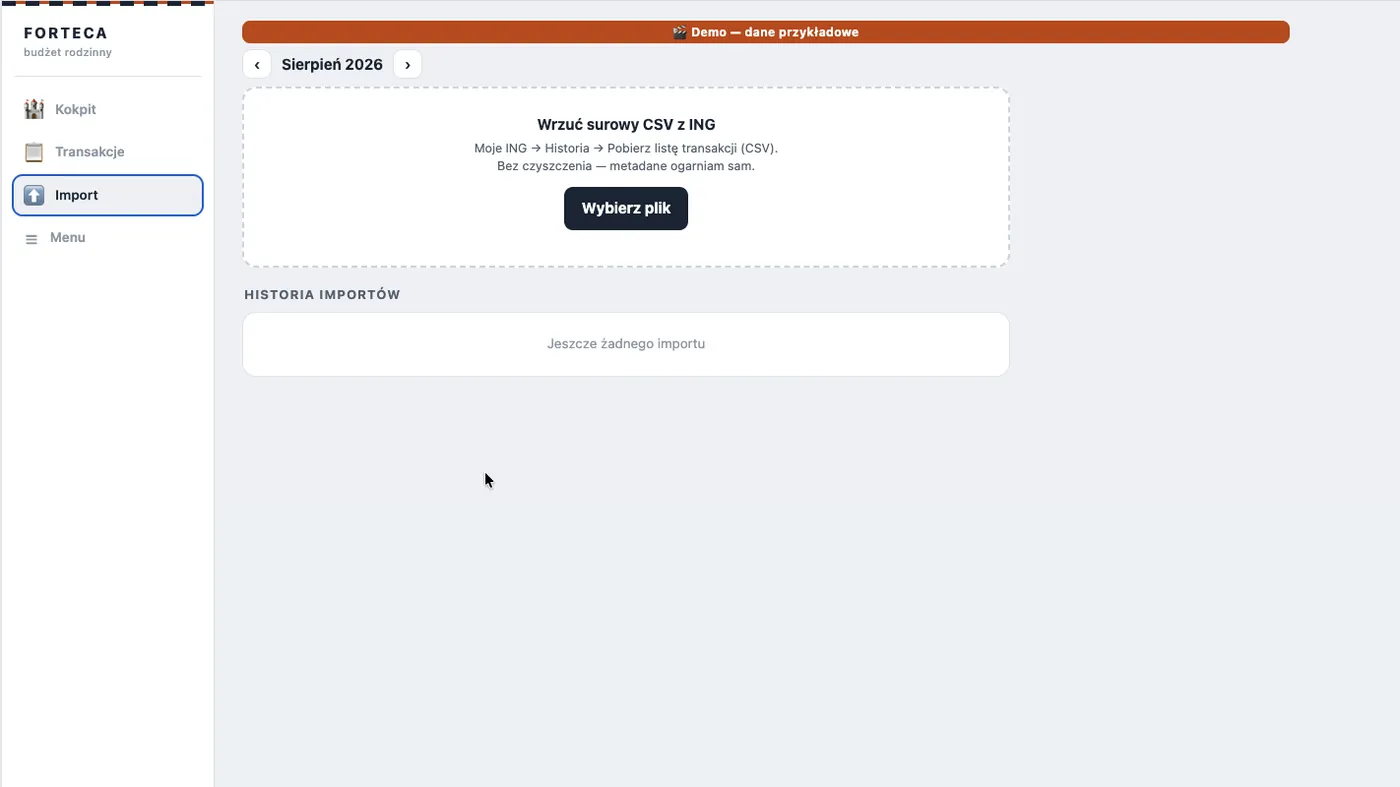
An import that needs no file preparation
The CSV file downloaded from the bank goes into the system exactly as the bank produced it. No cleaning up columns, no fixing headers, no stripping metadata. The parser recognises the structure on its own and rejects duplicates, so the same statement can be uploaded twice without consequences.
The whole import comes down to picking a file. Every screenshot comes from the demo context and uses sample data.
A categorisation engine that learns from your corrections
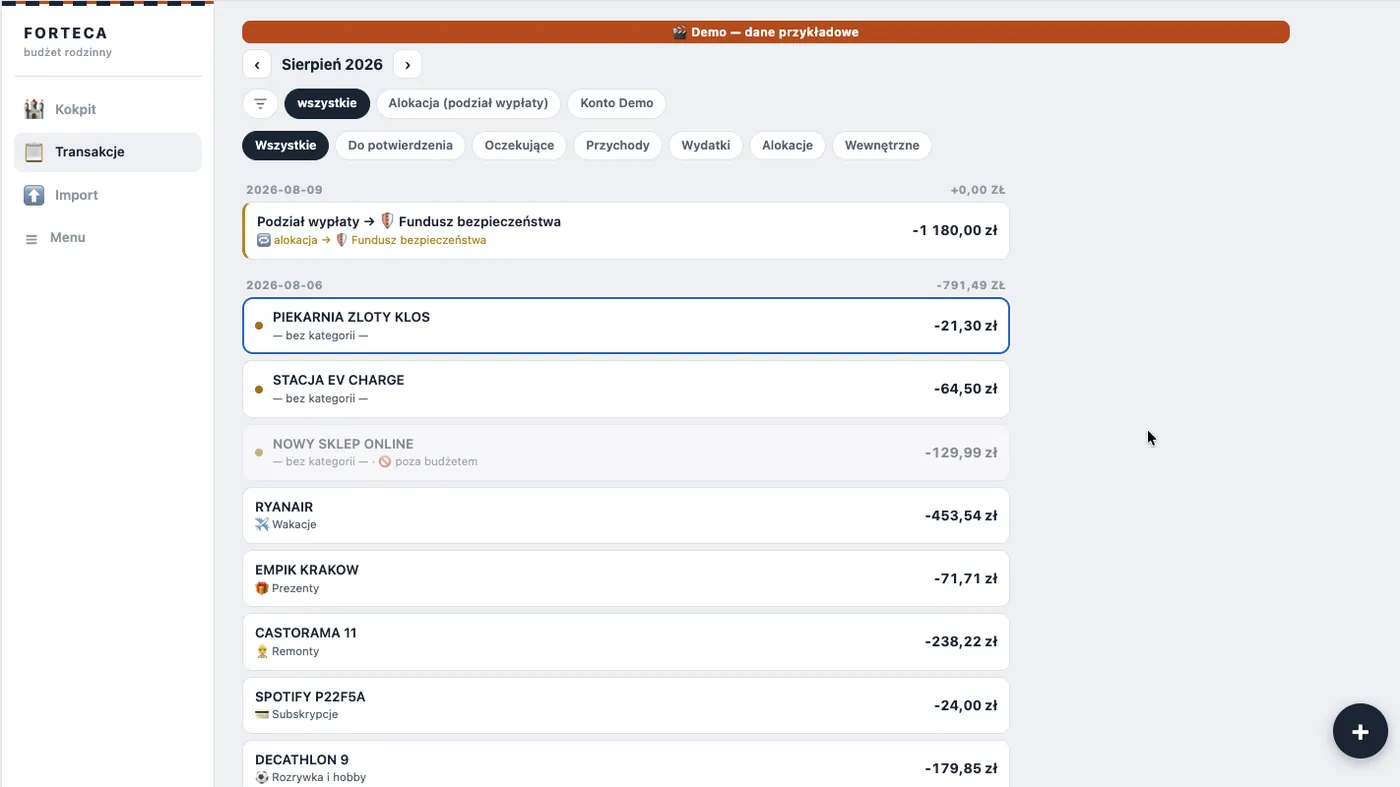
Categorisation runs in three stages. Rules first, then the history of earlier decisions, and only at the end a language model. That order matters both for cost and for quality: the model is asked only about transactions the first two stages did not recognise, which is why it accounts for a fraction of the bill.
Automatic categorisation reaches 94.7% accuracy, measured on 720 transactions across 12 months. The remaining entries land in a “to confirm” queue together with a suggested category. One tap confirms or corrects the decision, after which the engine remembers it for the future. The longer you use the system, the less often you have to correct anything.
Transactions recognised automatically already carry a category. The unrecognised ones wait for a single tap, which at the same time teaches the engine.
Privacy built into the data flow. Before anything reaches the language model, the system strips national identification and phone numbers out of the description and counterparty fields, and replaces sensitive values with hashes. The model receives only what it needs to recognise a category.
The envelope model: saving that does not break the budget
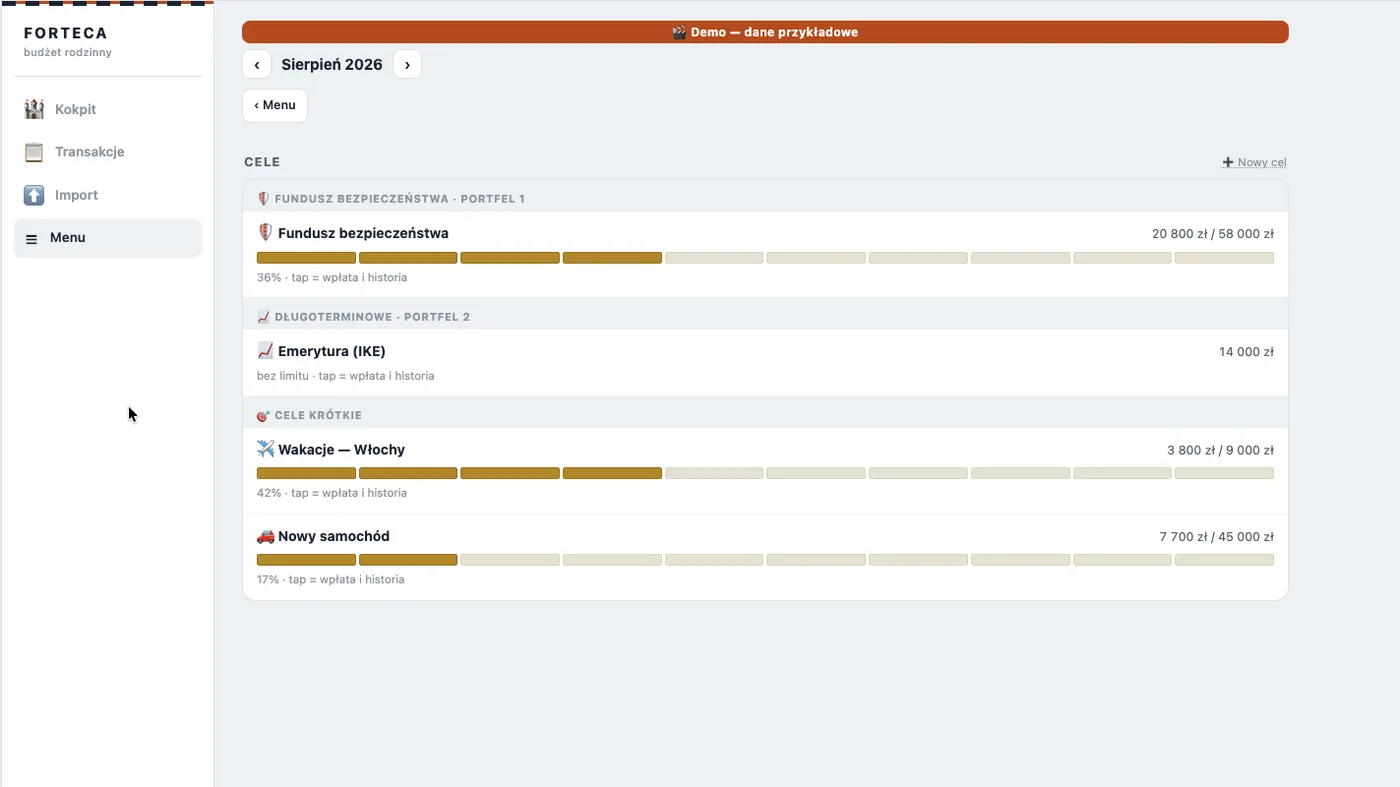
Setting money aside for a goal is not an expense, yet most tools treat it as one, which is why the monthly budget stops adding up. In Fortress an allocation to a goal is a separate type of operation. When you later pay from those set-aside funds, the system recognises that the expense has already been covered and does not count it twice.
The same mechanism drives the long-term portfolios: the safety fund, the retirement portfolio, the long-term one and the aggressive one. Short-term goals additionally carry light gamification, with bricks collected towards a target and a deadline.
Goals and portfolios follow the methodology from “Finansowa Forteca” by Marcin Iwuć, on which we based the logic for splitting funds.
Splitting the salary without supervision
The system recognises salary income and proposes a split according to a percentage plan agreed in advance. The decision about how much goes to the safety buffer and how much to the portfolios is made once. After that it happens automatically, so financial discipline no longer depends on willpower on payday.
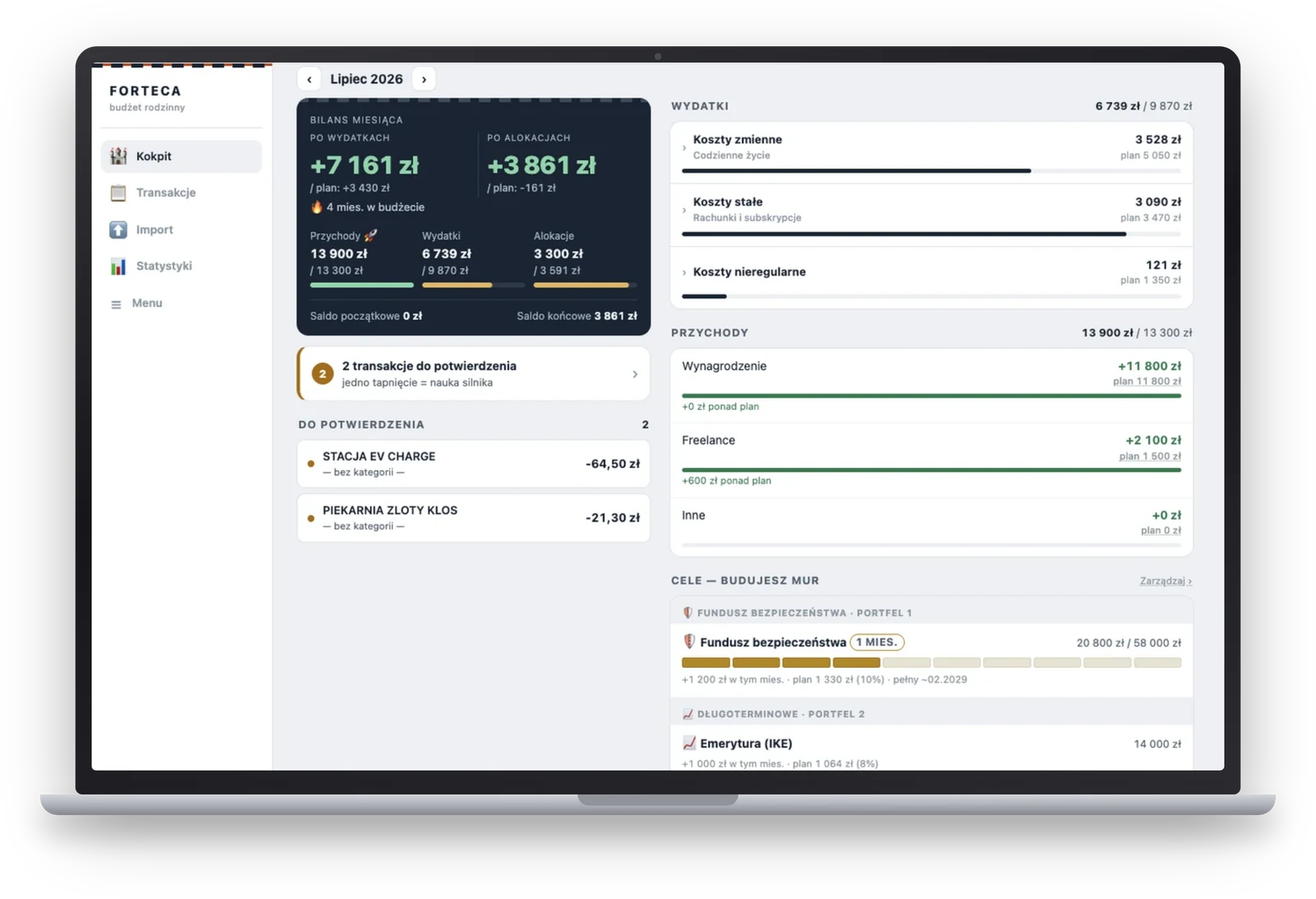
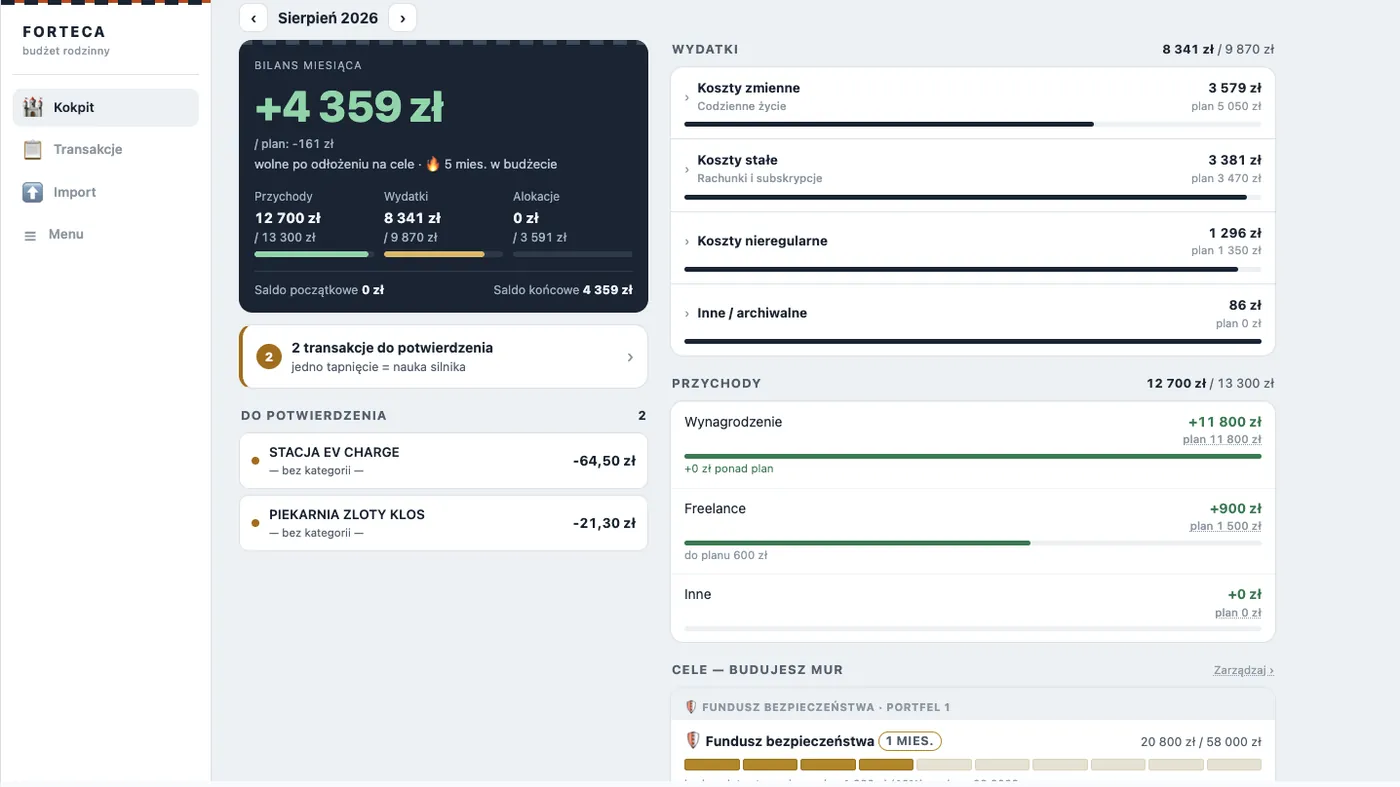
A dashboard where the plan sits next to the actuals
Every category has a default budget and can be overridden for a chosen month without affecting the others. Spending, income and allocations are shown as plan versus actuals, so an overrun becomes visible at a point when there is still time to react.
A category that goes over budget changes colour and shows the overrun amount. Nothing has to be calculated by hand. Demo data.
Three data contexts in one system
Family finances and the finances of a sole proprietorship follow different rules, yet keeping them in two separate tools ends with one of them being abandoned. Fortress solves this with a context switch: family, business and demo. Each context has its own categories, budgets, income and goals, and the data never mixes. The business context shows the real profitability of the company, while the demo context makes it possible to show the system to anyone without revealing anything private.
An app with an icon on the phone home screen
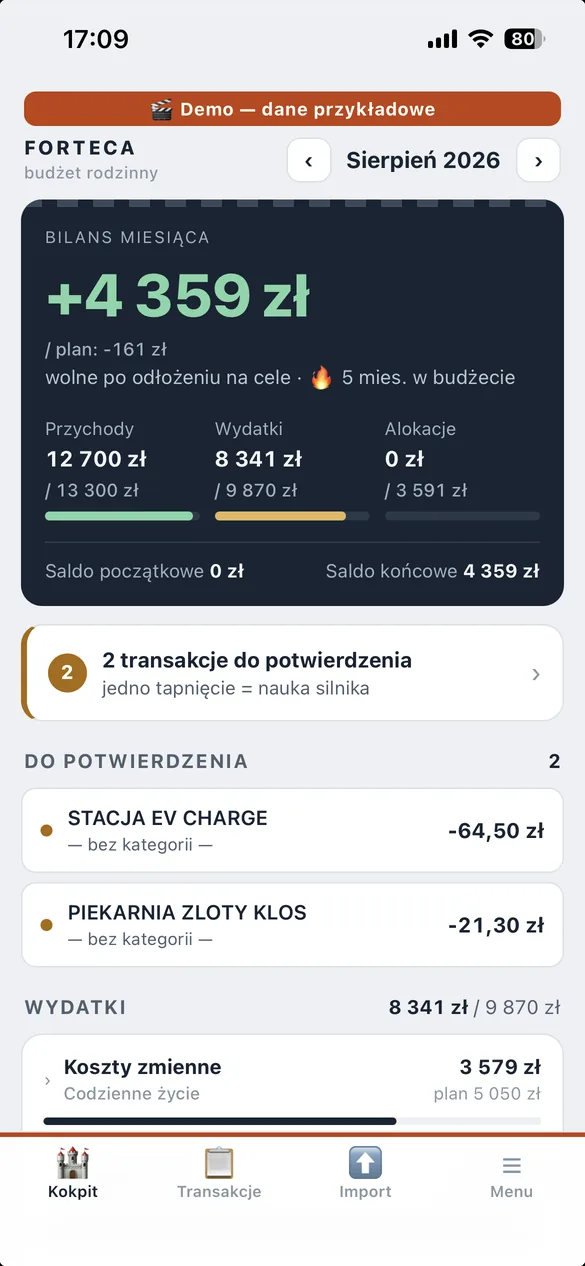
The system runs as a progressive web app (PWA), so once added to the home screen it behaves like a native application: its own icon, full screen, a bottom navigation bar. There was no need to build separate iOS and Android versions, and every update reaches everyone immediately, without going through app stores.
This has a practical consequence: a cash expense is added at the checkout in a dozen seconds, because the app is a thumb away. That exact barrier was what left the spreadsheet with incomplete data before.
The icon on the home screen. It opens like a normal app, without a browser.
The same dashboard on a phone, with the navigation bar at the bottom. Demo data.
Security taken seriously from day one
Sign-in is based on Cognito with a second authentication factor in a mobile authenticator app. The system runs on a separate AWS account, fully isolated from the company infrastructure, with its own billing. On top of that comes a full set of web-layer protections: a CSP policy, HSTS, request rate limiting, an import size limit and automatic deletion of uploaded files after 30 days.
Project timeline
Five days, day by day
The timeline below is not a reconstruction from memory. We rebuilt it from the project documentation: the progress log, the deployment log and the register of architectural decisions. The work happened after hours and the total effort came to 20-30 hours.
The trail in the repository: 20 documented deployments, 18 architectural decisions, 41 automated tests.
Day 1
From specification to production
The specification was written from screenshots of the existing spreadsheet and a list of requirements prepared by the owner. On the same day: a separate AWS account with its security baseline, the first backend deployment, the PWA served from CloudFront, approved mockups and a real bank file analysed. By the evening the system was running in production and testing on real data had begun.
Goals, portfolios and the envelope model
Day 2
Default budgets with per-month overrides, the automatic salary split, goal gamification and full category management. That day also brought the key architectural decision: allocations became a separate type of operation, which removed the double counting of expenses.
Days 3-4
Code review in four independent passes
A full code review, followed by critical and high-priority fixes shipped in three batches. Among the items closed: protection against a double click on the salary split, query pagination and import edge cases. In parallel, the recurring payments feature was built.
Day 5
Data contexts and security hardening
Splitting the data into three contexts: family, business and demo. On top of that, 34 fixes in two batches and a full security pass: a second authentication factor, shorter token lifetimes, a CSP policy, HSTS, request rate limiting and moving sensitive values out of the function configuration. The day closed with 41 tests passing and zero open items from the code review.
Since then
Daily use and further development
The system handles both family and business finances. Further changes ship as needed, in the same way of working.
Results
Measurable outcomes
The most interesting number in this project is not the build time but the running cost. Below is the actual AWS invoice, together with a comparison against the quote the same scope would have received at a traditional software house.
10-20×
Less manual work
About an hour a week before, now 5-10 minutes
94,7%
Automatic categorisation
Measured on 720 transactions across 12 months
$0,65
Monthly running cost
The actual AWS invoice, August 2026
0
Open items from the code review
With 41 automated tests passing
What makes up the 65-cent invoice
The breakdown is worth a look, because it says more than the total.
Item
Monthly cost
Infrastructure compliance auditing (AWS Config)
$0.61
File storage (S3)
$0.02
The AI model categorising every transaction
$0.02
Database, API and the remaining services
$0.00
Total
$0.65
The application itself costs four cents a month. More than 90% of the invoice goes to the service that watches over infrastructure compliance and security, not to running the system. Security was a design decision here, not a place to cut costs.
A reference point: the same scope at a software house
The quote comes from the software house we used to run and is based on its 2018-2020 price list, so it is not theoretical.
Base version: $7,500-10,000 and 2-3 months of delivery.
The changes that took two days in Fortress: another $7,500-10,000 and 1-2 months.
In total $15,000-20,000 and 4-6 months.
The same scope was built in 20-30 hours of one person's work, and keeping it running costs 65 cents a month.
"
I did not believe a system like this could be built in a few days. For ten years I paid for tools that either cost too much time or offered too few features. Today the same problem is solved by an application built to measure, running for 65 cents a month. In companies it looks exactly the same: the process is unique, an off-the-shelf product does not fit, and a large system is overkill.
Krzysztof Gromadzki
Founder of RapidLogic, 15 years building systems for companies
Next project
Do you have a process that eats your time?
If a key process in your company runs on a spreadsheet and manual work, it can probably be solved faster and cheaper than you assume. A free digital audit will point out at least three areas of savings, with no commitment on your side.