Collecting invoices for the accountants: three mailboxes, an e-invoicing platform, portals that never send anything by email and a checklist of twenty-odd items to tick off. Ninety minutes every single month. Too small a process to commission a system for, too tedious to live with. It was built in 2-3 working hours and costs around 42 cents a month.
90 min → 15 min
Time to close a month
2-3 h
Working hours to build
100%
Of the invoices collected
~$0.42
Estimated monthly cost
Context
A second attempt at the same problem
This system was built right after another in-house project, the Fortress finance system. That result was surprising enough that the next target became a problem postponed for years: collecting invoices for the accountants every month.
A first attempt a few months earlier had failed. Our knowledge of the tools was far smaller back then, and the problem turned out to have more layers than it appeared to. Only the experience gathered while building the systems that followed made it possible to return and finish the job in a few hours.
We show this project openly, because it is an honest illustration of how far the break-even threshold has moved. The same person, the same problem, a different level of skill after several months of working with AI-Assisted Engineering.
Challenge
Why nobody automates a process like this
The problem was never the number of documents, it was that the setup differs in every company. In a one-person business the invoices had scattered over the years across private and company mailboxes alike. Tidying that up is not an option, because some of the accounts serve private purposes as well and cannot be moved to a company address.
On top of that come the channels: some documents arrive through the national e-invoicing system, some by email, and some stay inside portals that require a login. A few systems never send an invoice at all, which is the hardest case of the three, because a missing document announces itself in no way whatsoever.
Before the system
Ninety minutes a month spent going through every source
A checklist in a reminders app, ticked off by hand
Checking the same things several times over, to be sure nothing slipped through
The accountants kept their own list and chased the missing documents
Tedious work, the kind that invites mistakes
After the rollout
Five to ten minutes a month, mostly reviewing the result
The checklist as a configuration file, shared by the system and the human
The job starts by itself on the third day of the month, the laptop may stay off
A complete set of documents on Drive and a ready draft message to the accountants
Anything doubtful lands in a queue instead of being decided quietly
Solution
What we built
The starting point was unusual: a rule-based job stood no chance here. Rules are enough when documents arrive in a predictable shape, whereas here some invoices never arrive at all and others hide inside messages that look like ordinary confirmations. That is why the core of the system is a language model that reads the content of each message and works out what is missing.
The monthly checklist as configuration
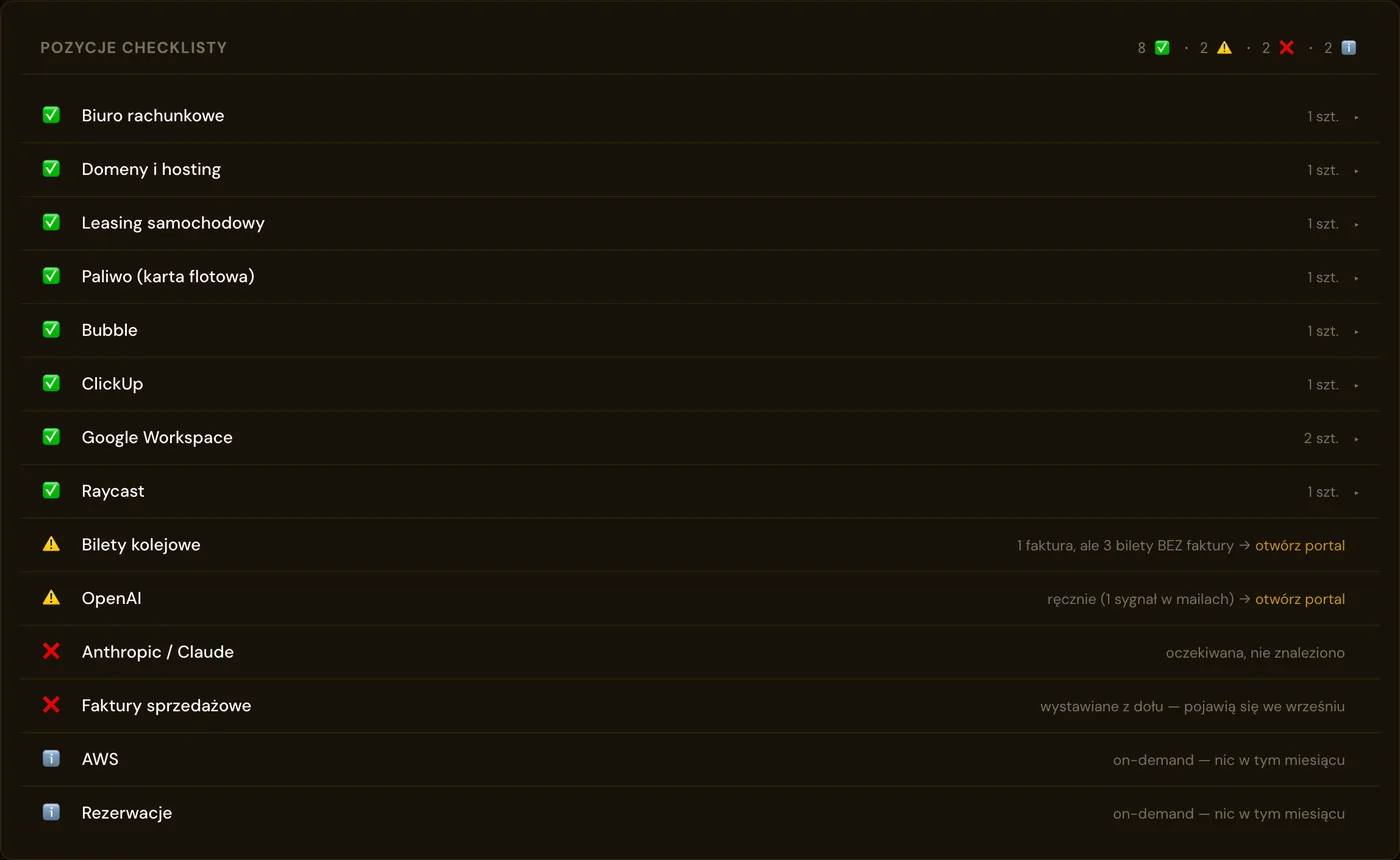
The very list that used to be ticked off by hand became a file in the repository. Twenty-odd entries, each one knowing where to look for its document: in which mailbox, by which phrase, from which sender. One source of truth for the system and for the human alike.
The whole list in a single view. Every entry carries its own status, so what stands out first is whatever is missing: documents to fetch from a portal, invoices still expected and entries inactive in a given month. All screenshots come from the demo version, on sample data.
A job that needs nobody at the keyboard
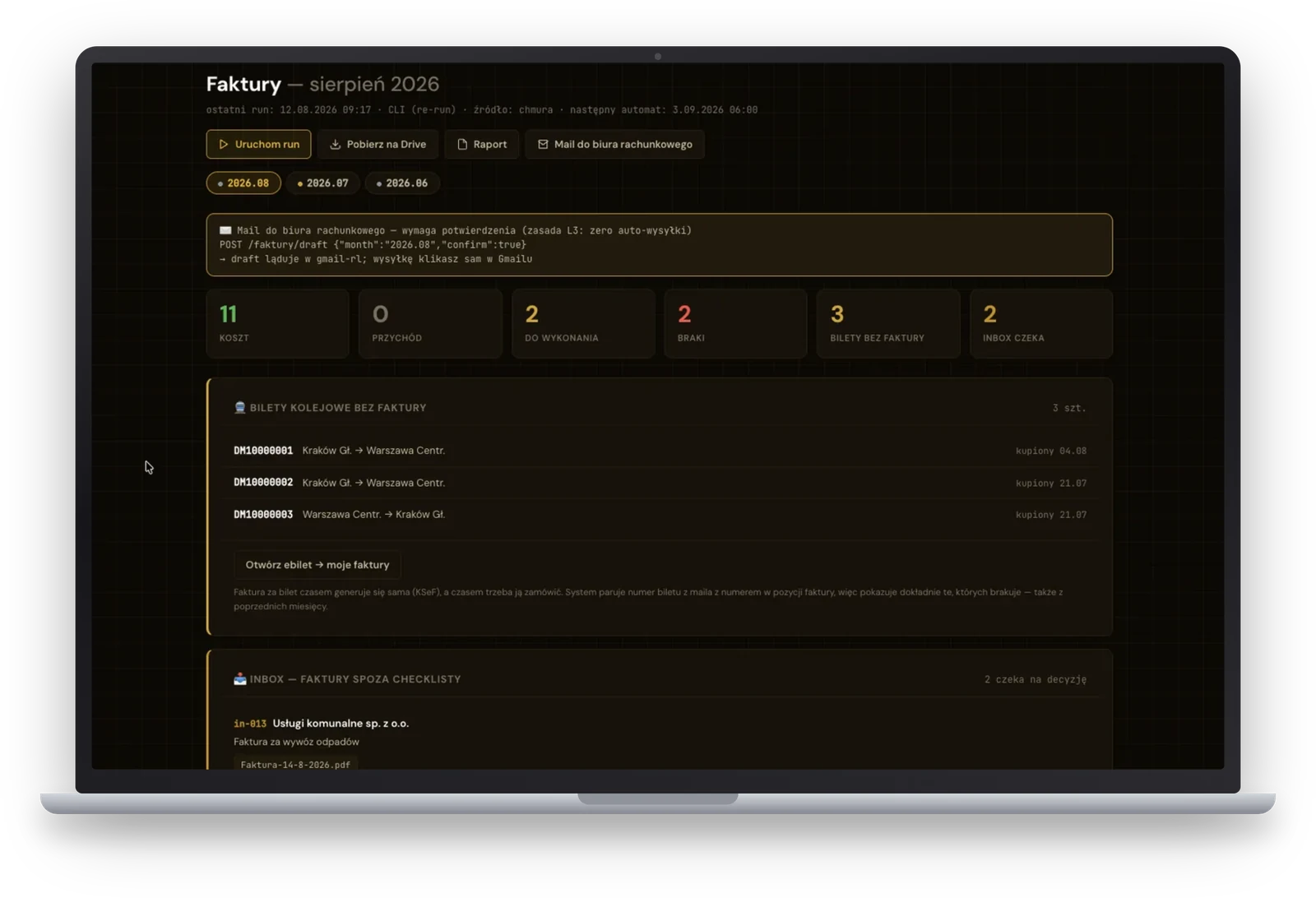
On the third day of the month at six in the morning the system wakes up in the cloud and collects the documents for the previous month. Nobody has to be present for that. A re-run on demand is available from the command line as well as from the portal.
A decision gate: the system suggests, the human approves
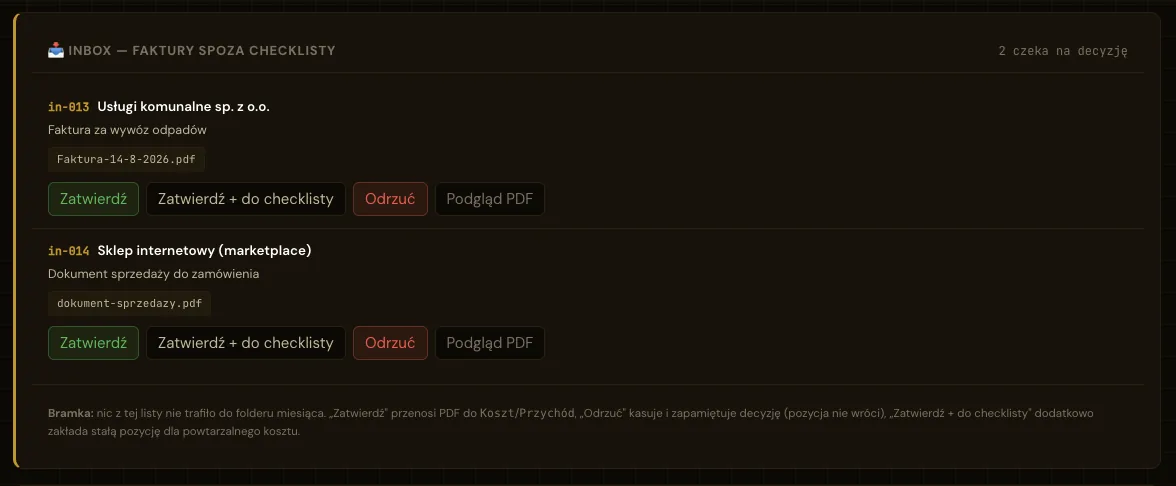
Documents outside the checklist neither disappear nor slip quietly into the folder. They land in a queue together with the system’s recommendation, and the decision belongs to the human: approve, approve and add to the list permanently, or reject. The reason is concrete: some of the findings are private purchases, quotes or duplicates that are not a business cost at all.
Nothing on this list enters the monthly folder on its own. A rejection is remembered, so the same entry does not come back month after month.
Catching the invoices that do not exist
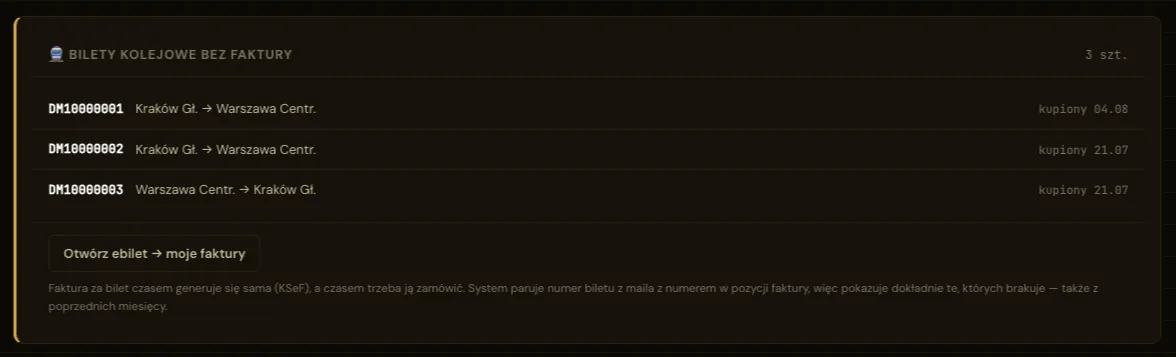
When a train ticket is bought, the invoice sometimes arrives by email and sometimes does not, with no legible rule behind it. The model recognises the purchase confirmation itself, adds the journey to the list and looks for the matching invoice. Journeys for which it finds none go onto a separate list with a request to download the document from the portal, including those from earlier months.
This is the case an ordinary rule-based job cannot handle. A missing invoice produces no signal at all: no email, no file, no error. It can be detected only by understanding the content of another message and setting it against what is absent.
The ticket number from the message is matched against the number on the invoice line. What remains are only the journeys whose document is genuinely missing.
One click: Drive and the message to the accountants
Once the review is done, the system arranges the complete set of documents on Google Drive in an agreed folder structure, split into costs and revenue, and then prepares a draft message to the accountants. The message waits in the mailbox, because sending anything to a person is always clicked by a person. The same rule holds across every system we build.
A history of months instead of digging through the inbox
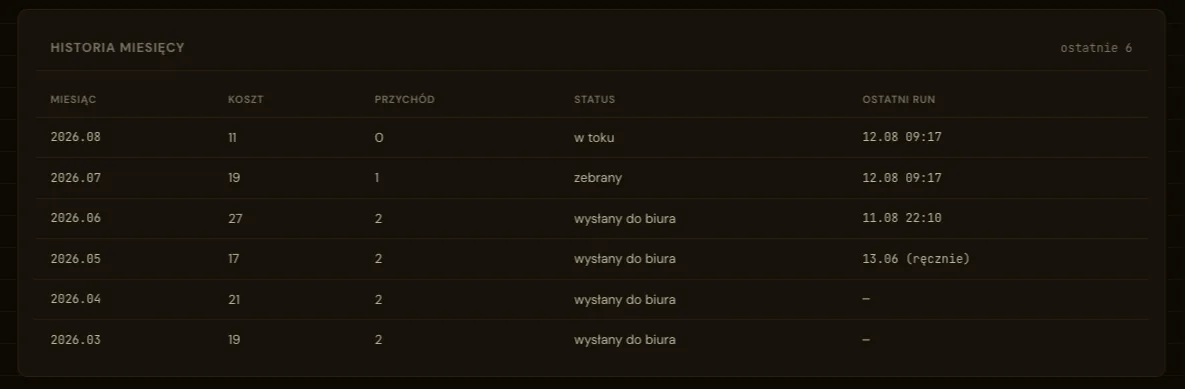
Every month carries its status, the number of costs and revenue documents collected and the date of the last run. The question “have I already sent the documents for May” no longer requires searching the mail.
The last six months in a single view, each with the status of the handover to the accountants.
Project timeline
What was built, in order
The sequence was reconstructed from the project deployment log. Total effort came to 2-3 working hours. It is worth adding that this was the second attempt, because the first one, made a few months earlier, had failed.
Attempt 1
A failed attempt, a few months earlier
The problem was understood, yet the knowledge of the tools at that time was not enough to finish it. The subject only came back after several further systems had been built the same way.
Step 1
The checklist and collecting from many sources
The list of expected documents moved from a reminders app into a configuration file. Three mailboxes connected on existing credentials, alongside the invoicing platform with costs pulled from the national e-invoicing system. A first collection run, a comparison against the list, a report.
Step 2
Calibration on real data
Working out which supplier lands in which mailbox, filtering out terms of service and confirmations that are not invoices, matching tickets to invoices, the decision gate for documents outside the list, and counting revenue by the date of sale.
Step 3
A test against a closed month
A backwards run on a month that had been settled by hand earlier, then a document-by-document comparison of the result with the folder handed to the accountants.
Step 4
Cloud, portal and the message to the accountants
Moving the run into the cloud together with its schedule, a section in the portal showing the status of the month, and a draft message following the template used manually before. Finally, a complete set of automated tests.
Ever since
The month closes itself
The system runs on its schedule, and the human role comes down to reviewing the result, settling the doubtful entries and clicking send.
Results
Measurable outcomes
The most interesting part of this project is not the ratio of hours saved, it is how low the barrier to entry turned out to be. Below are the outcomes and the test run against a month settled by hand earlier.
~10×
Less work each month
From ninety minutes to a five to ten minute review
2-3 h
Working hours to build
The effort pays for itself after the second month
100%
Of the invoices collected
Backwards test on a closed month, zero false positives
~$0.42
Estimated monthly cost
Mostly the secure storage of access credentials
The test: a month settled by hand earlier
To find out whether the system could be trusted, we ran it backwards over a month that had already been closed by hand, then compared the result document by document with the folder handed to the accountants.
23 of 27 cost documents and every revenue document collected automatically.
The four remaining entries are the ones deliberately left manual, because they come from portals that never send documents by email.
Zero mistakes within the scope the system is meant to cover.
A conclusion that matters more than the hours saved: the manual work was being done correctly, yet it cost ninety minutes of focus and required checking things several times over. The system does the same thing repeatably, and shows the doubtful entries for a decision instead of settling them on the human’s behalf.
The effect no table will show
The accountants kept their own list of what should arrive and chased the missing documents. Sometimes twice a month, sometimes not at all. That correspondence has disappeared, because the complete set now reaches them the first time.
"
In my head this problem was unsolvable. Every company has a different set of tools, mailboxes and expenses, so an off-the-shelf solution does not exist, while building your own always looked out of proportion to the result. It took a few hours. We have dozens of processes like this one in our companies.
Krzysztof Gromadzki
Founder of RapidLogic, 15 years building systems for companies
Next project
How many processes like this do you have?
Usually a dozen or so, sometimes several dozen. Each one too small to commission a system for, and each one taking hours every month. The savings on the first fund the automation of the next, which is why it pays to start by working out where you lose the most. A free digital audit will point to at least three such areas, with no obligation on your side.