← All case studies
RapidLogic in-house project
Logistics / Municipal services · Operations panel (no-code)

A dispatcher panel for a company that runs on paper notes

A typical septic service company runs 5 to 15 trucks, keeps every job on paper and has an owner who answers the phone from 6:00 to 22:00, Saturdays and holidays included. We built an operations panel for exactly that company: automatic zoning, drag-and-drop route planning and a price matrix that carriers told us could not be built. The research and design alone took 3 to 4 weeks, because without understanding the trade this system would make no sense.

The Tidly panel: route planning in columns assigned to trucks, with jobs that can be dragged between vehicles
7
Competing systems analysed
10
Interviews with septic companies
3-4 wks
Research and design before the build
5-15
Trucks in a typical fleet

A trade that runs on a phone and a notebook

Tidly is a RapidLogic in-house project, a two-sided platform connecting homeowners with septic service companies. The customer side, meaning the marketplace with its price comparison and sensor-driven automation, is covered in a separate case study. This entry is about the other side of the mirror: the panel where the company runs its daily work.

Before a single screen was configured, we checked how that work really looks. The vast majority of these companies run 5 to 15 trucks and keep all their paperwork on paper. Someone sits by the phone practically all day, and in smaller companies that someone is the owner. The company that served our own tank answered the phone from 6:00 in the morning until 22:00 at night, on Saturdays, Sundays and public holidays.

The most important sentence we heard from carriers, however, was about something else. Building the daily route plan is the most demanding part of this job, because that is where the profitability of the company is decided. A well-planned day means more jobs from the same truck, while a badly planned one means empty runs that nobody pays for.

A working day that starts with a sheet of paper

These companies fall into two groups. The better organised ones plan calendars ahead, use spreadsheets and messengers, and every driver has their own e-mail account. There are few of them. The vast majority plan routes on the fly: whatever comes in by phone that day gets added to a driver’s route, in the hope that it happens to be on the way.

The problem is not that paper fails. The problem is that a dispatcher planning the day for a dozen or more trucks works from memory and instinct, and every change during the day means planning everything from scratch.

How it looks without a system

  • A phone ringing from 6:00 to 22:00, on Saturdays, Sundays and holidays
  • Jobs written down on loose sheets and in a notebook
  • Routes planned on the fly, with no view of the whole day
  • The profitability of a run depending on the dispatcher’s instinct
  • A truck breakdown meaning the whole day gets planned again

How it looks in the Tidly panel

  • Jobs from the marketplace arrive on their own, with no phone call
  • Orders taken by phone are added manually in the same place
  • The whole day visible as lists beside the trucks and as a map
  • Jobs from a given zone reach the assigned truck automatically
  • A breakdown means dragging that truck’s jobs to the other drivers

Research first, the system afterwards

This project did not begin with building, but with learning somebody else’s trade. First we went through the market of software for septic service companies and picked seven leading systems for detailed analysis. From each of them we took the features that actually solve a problem, then redesigned them using our own experience from building a transport management system for meal-prep caterers, where last-mile logistics looks much the same.

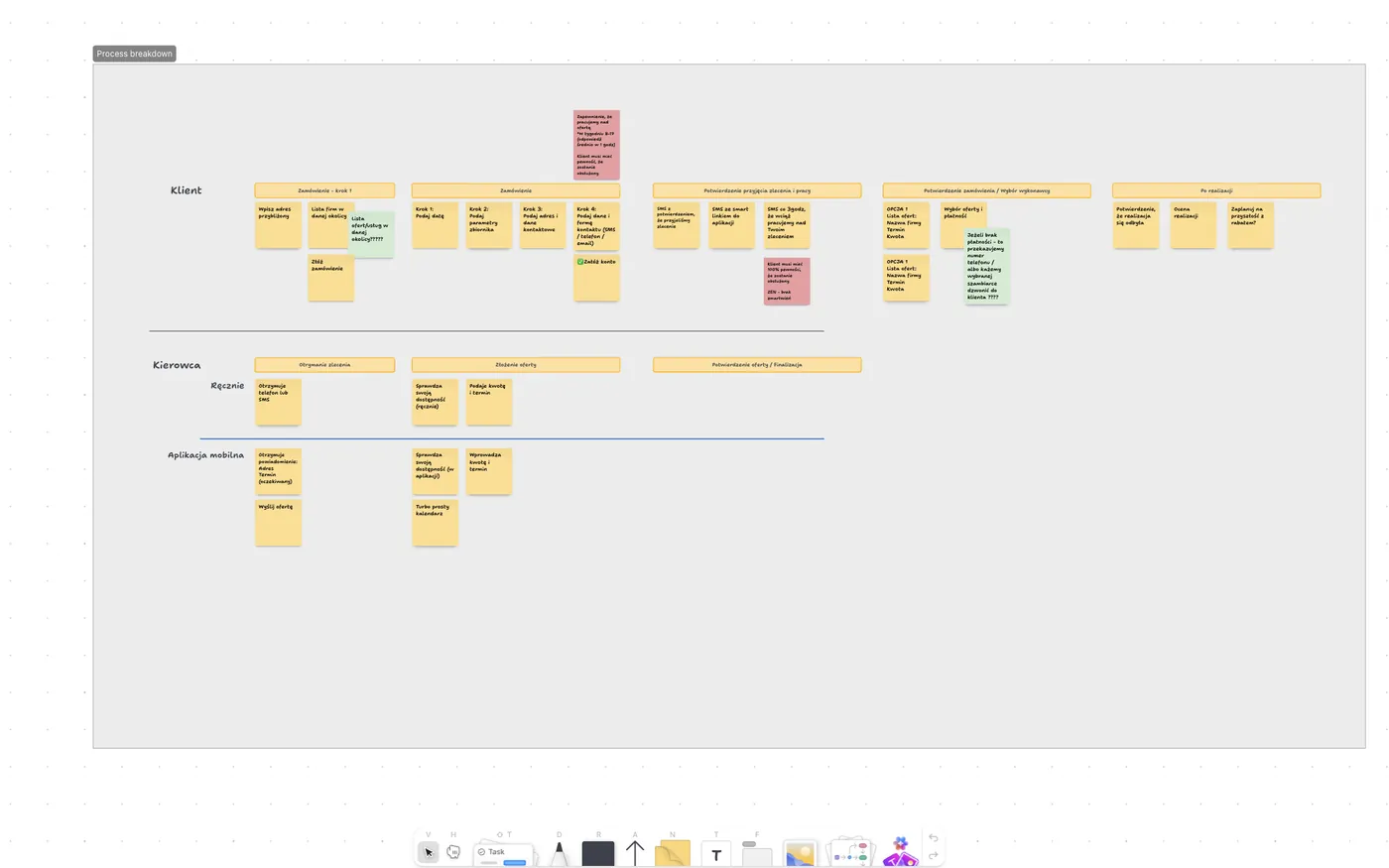
With the process design ready, we went to the carriers. We made around ten phone interviews and met in person with one of the most innovative companies in the region, to talk through what works in current systems, what is missing and how it should look. Only after that conversation did we start building.

A board with the order handling process mapped across three lanes: the customer, the driver working manually and the mobile app

The process mapped across three lanes before the build: what the customer does, what the driver does without a system and what the app takes over.

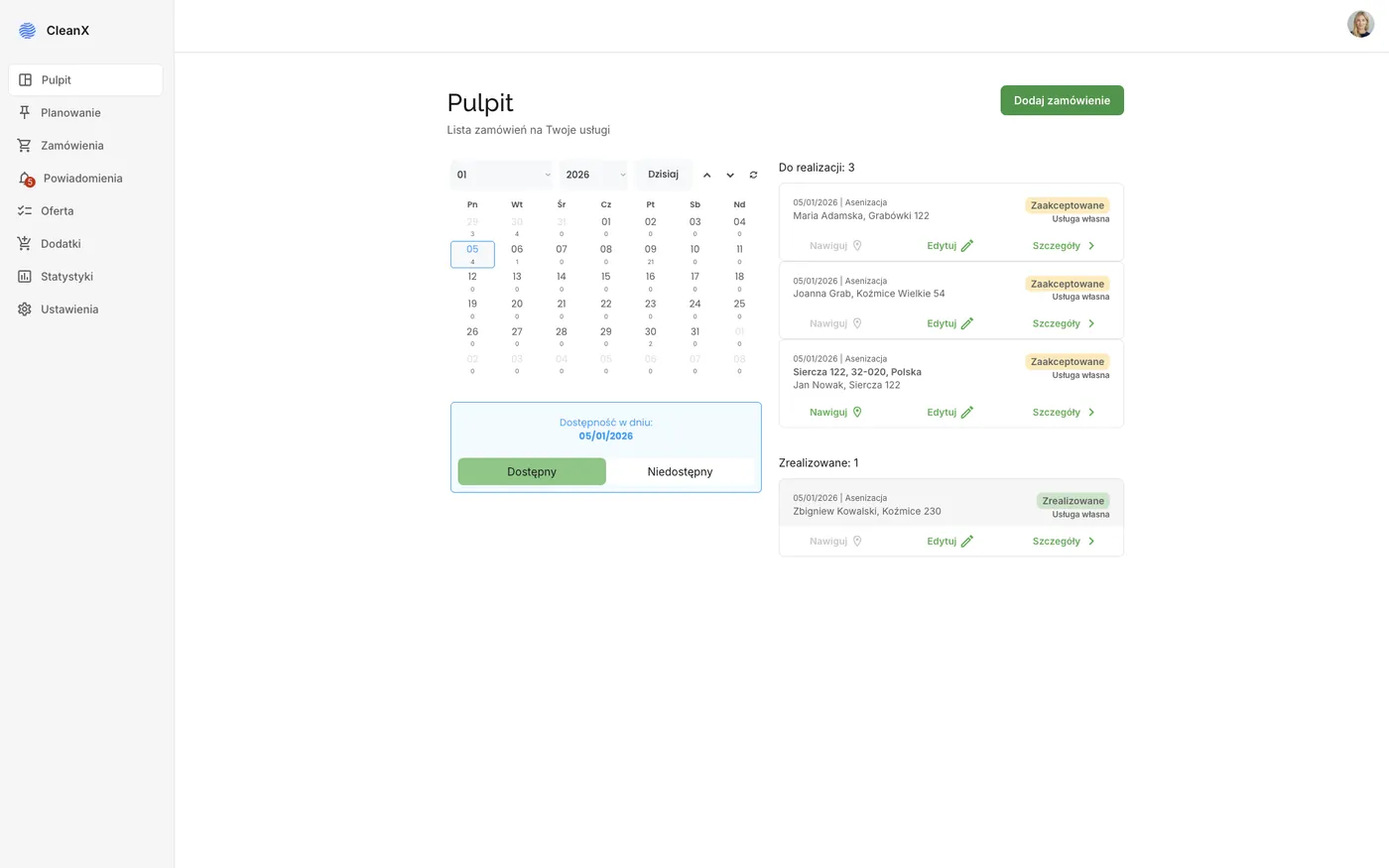
The dashboard, or the working day on one screen

The first screen after logging in answers the question every dispatcher asks each morning: what do we have to do today. It shows the jobs for the selected day split into pending and completed, a monthly calendar with the number of jobs on each date and a team availability switch. From the same place you can add an order taken by phone, because the phone does not disappear overnight.

The Tidly panel dashboard: jobs for the selected day, a monthly calendar with counters and an availability switch

The daily dashboard. All screenshots come from a demonstration account, on sample data.

Route planning: columns, dragging and a map

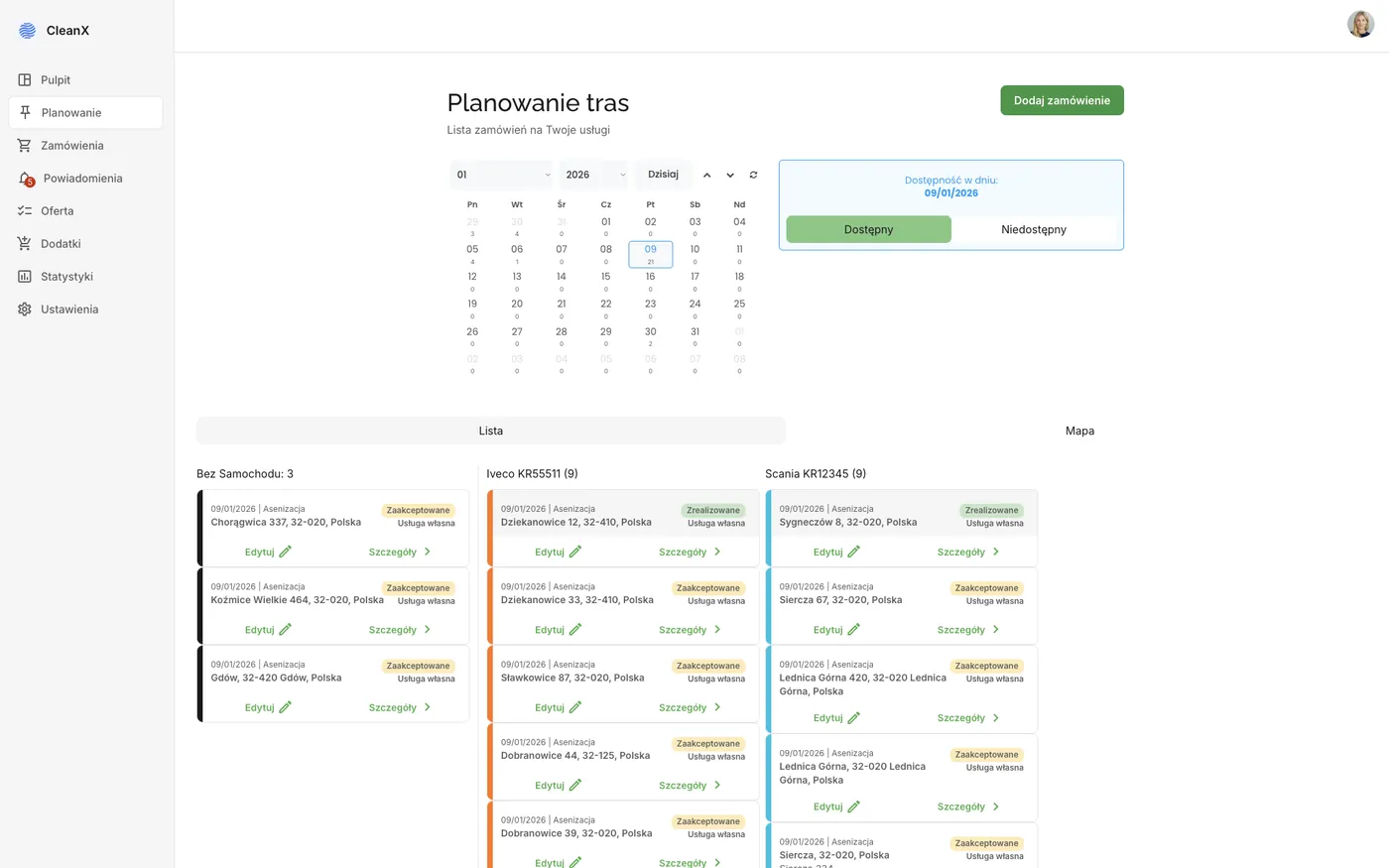
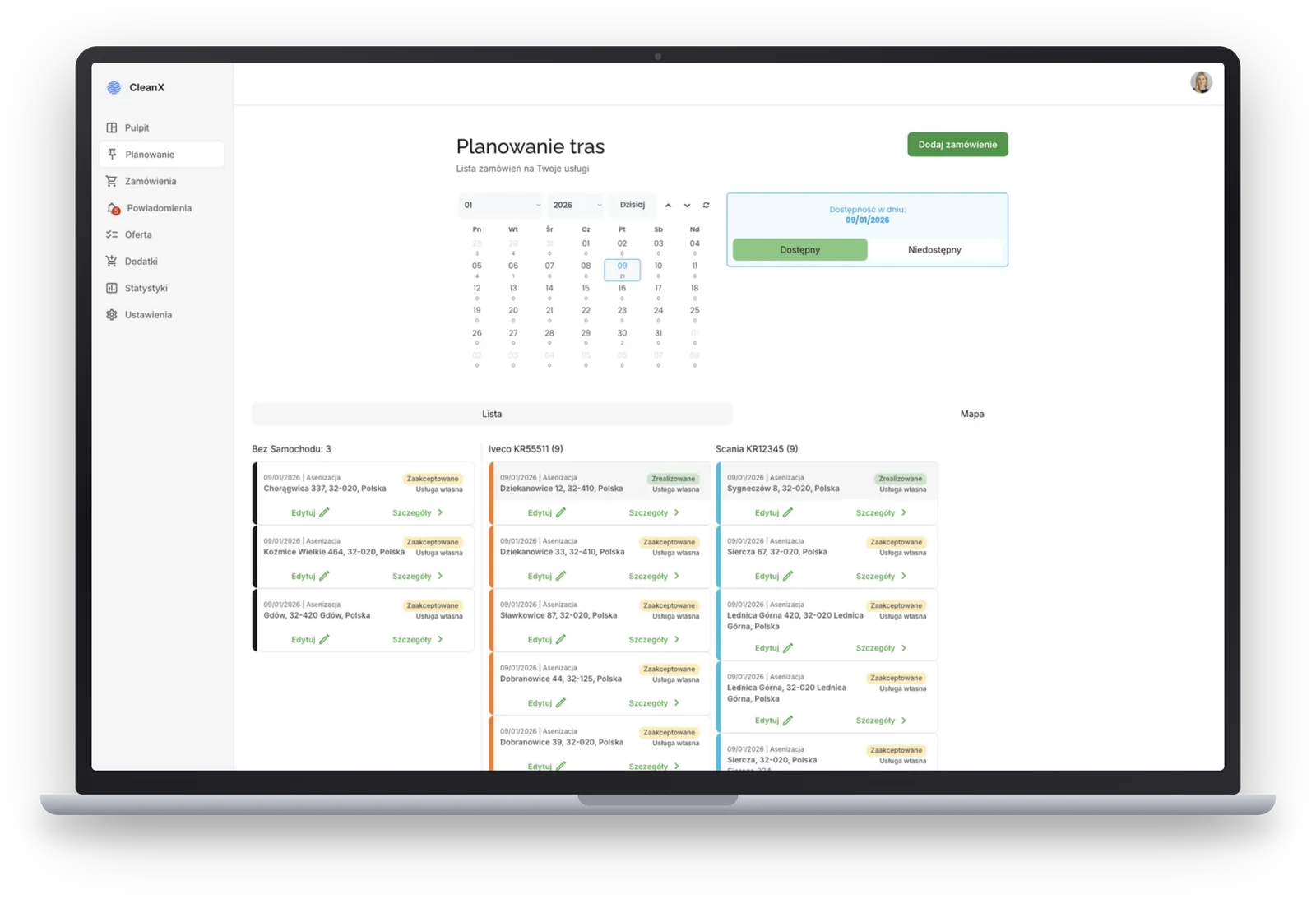
The heart of the panel is the planning screen. Jobs line up in columns assigned to trucks, next to a column of jobs not yet assigned. Assigning means dragging a job card onto the right vehicle, and the order of stops is set within that same column. A dispatcher who used to lay out sheets of paper for a dozen trucks gets the same picture on screen.

The Tidly panel: the planning screen for a single day, with the first column holding jobs that have no truck assigned and every further column belonging to one vehicle

The first column holds jobs with no truck assigned, every column after it belongs to a single vehicle. The switch above the columns opens the same day on the map.

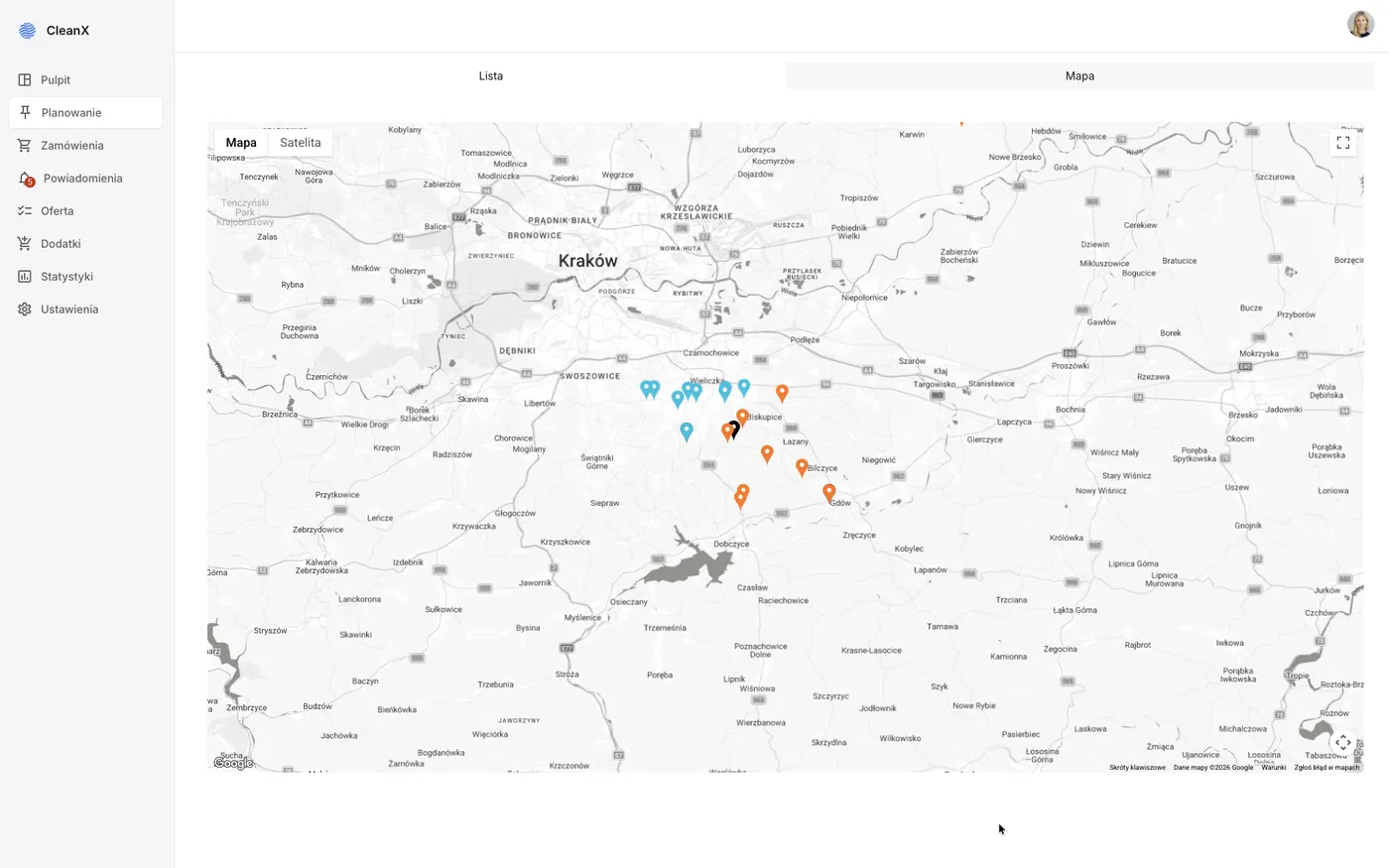
The second view of the same day is a map, where every job carries the colour of its assigned driver. This view exists for one specific situation that happens regularly in this trade: a truck breaks down, or gets stuck in the snow on the way to a property. Its jobs then have to be spread across the remaining vehicles, and looking at the map from above you can see at once who should take what. The same applies to an urgent job dropped in during the day, because you can see which truck is closest and which treatment station it should drive to for the run to pay off.

The map view in the Tidly panel: the day’s jobs marked with pins in the colours of assigned drivers, around Krakow and Wieliczka

The pin colour matches the driver. When a truck breaks down, you can see how to spread its jobs across the rest.

Two automations that take work off the dispatcher

The panel does not pretend it can plan everything for a human. Instead it takes over two tasks that repeat in the company every single day.

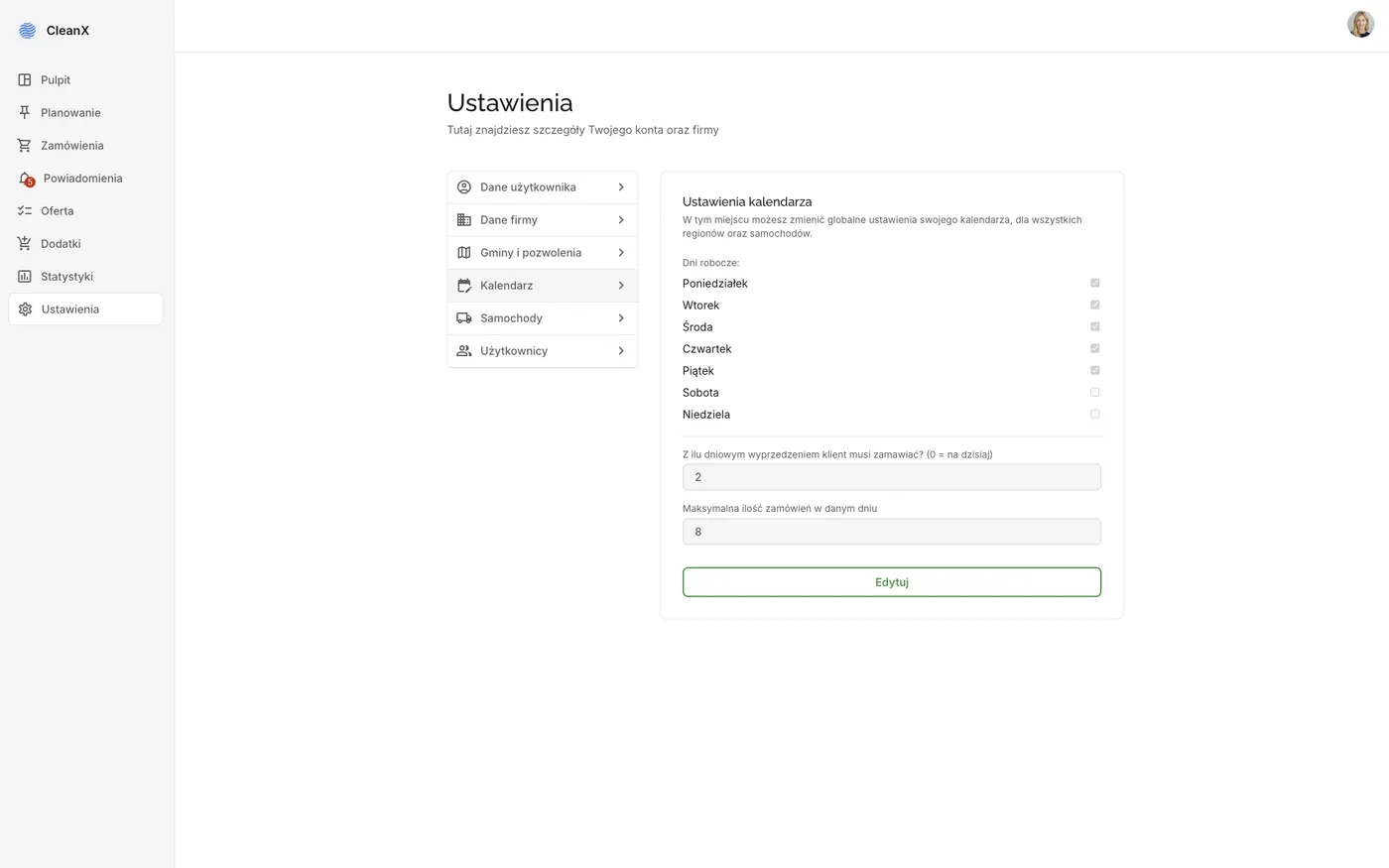
The second automation is more interesting than it looks, because it connects the panel with the marketplace. The availability calendar a customer sees when choosing a company follows directly from the fleet configuration and the limits set by the carrier. The company sets its own working rules, and the platform sells exactly as much as that company can handle.

Calendar settings in the Tidly panel: working days, required lead time for orders and the maximum number of jobs per day

Working days, required lead time and the daily job limit. This is where the availability shown to customers comes from.

The price matrix, the thing we were told could not be done

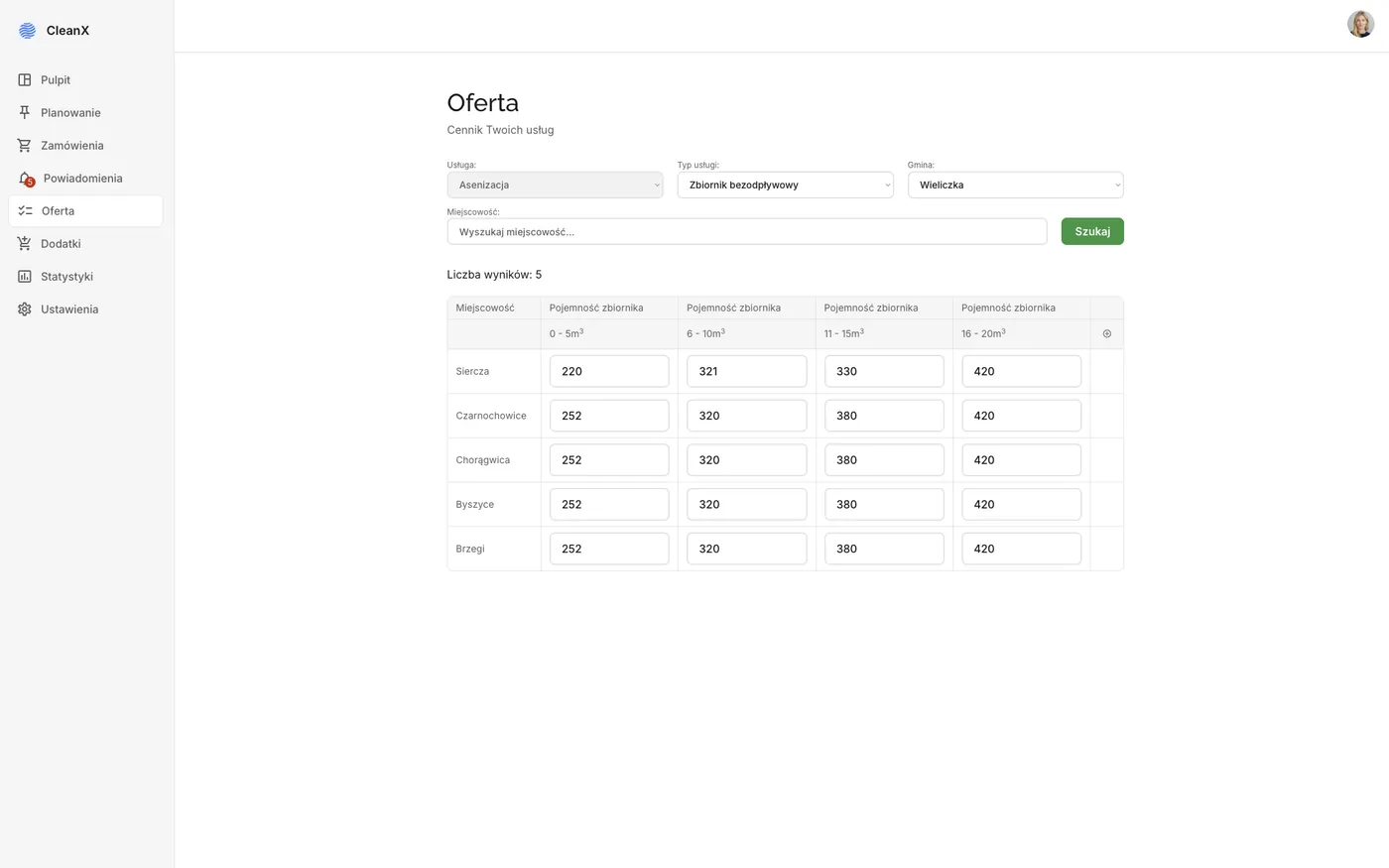
The hardest element of the whole panel turned out to be pricing. The price of a pickup depends at the same time on tank size, tank type, meaning whether it is a septic tank or a domestic treatment plant, the town, because that determines the distance to the treatment station, and on any extra services. In our interviews, carriers said plainly that putting this into a system could not be done and that prices would always be agreed in conversation.

Careful research showed, however, that a handful of companies manage it somehow. We gathered their practices, verified in interviews which extra services genuinely raise or lower the value of a job and how location affects it, and out of that the matrix was born. A company fills it in once for its towns, and the system sells its services at exactly those prices.

The price matrix in the Tidly panel: rows with towns and columns with tank capacity ranges from 0 to 20 cubic metres

The town in the row, the tank capacity in the column, all of it kept separately for each municipality and tank type.

On top of the matrix come extra services billed in bands. The most common example is the hose: the standard one reaches 20 metres, and every further ten metres is a separate charge. Thanks to that, a customer whose tank sits far from the road sees the real price of their service before ordering, while the driver does not have to negotiate a surcharge on site.

Orders from two worlds in a single list

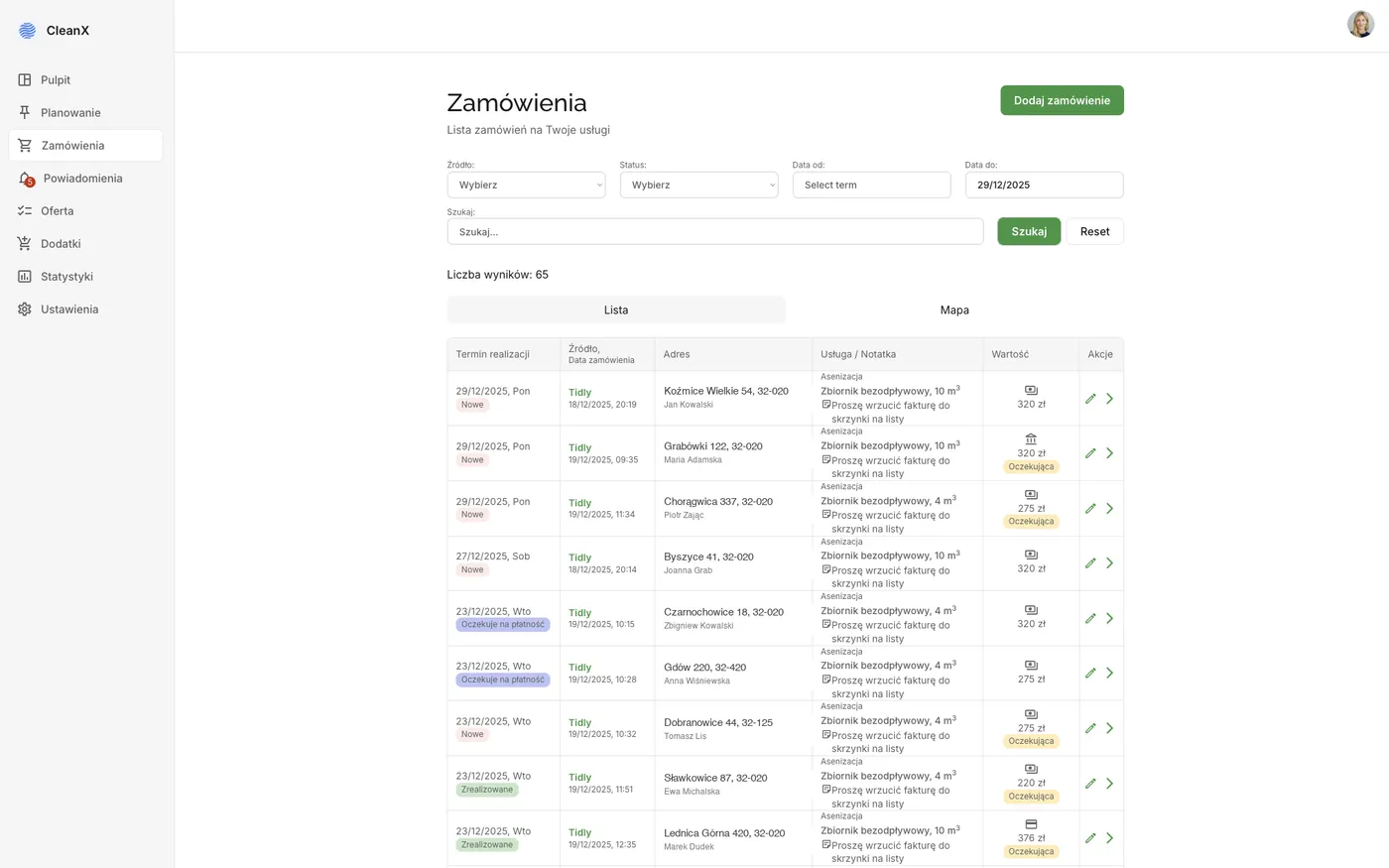
Jobs reach a septic company two ways: from the platform and the classic way, by phone. The panel treats both the same, marking only the source. The list can be filtered by source, completion status, payment status and date range, while the search box finds a job by customer or address.

The order list in the Tidly panel with filters for source, status and date range, and columns for address, service and value

Jobs from the platform and orders taken by phone in one place, with the source marked.

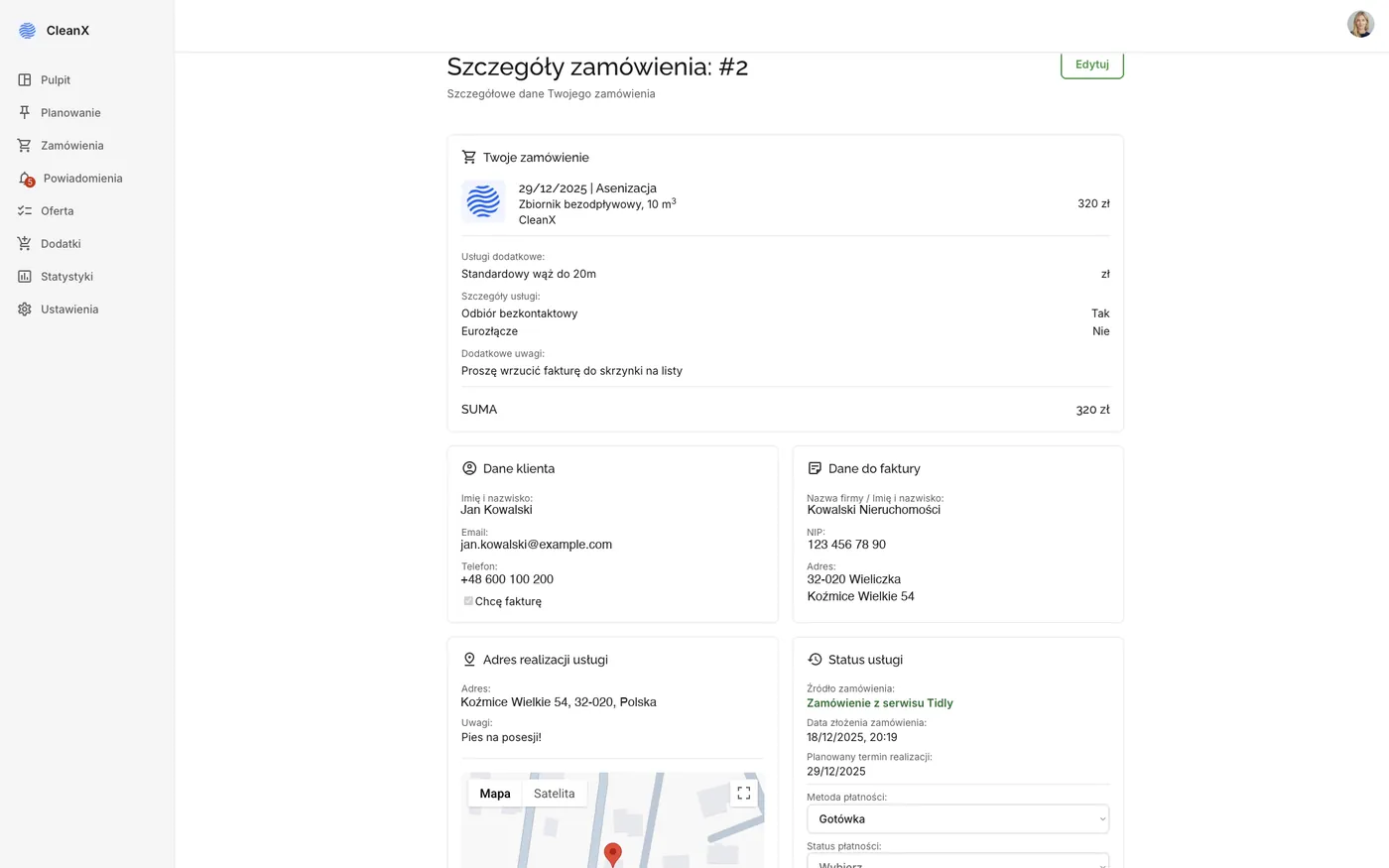
The detail view gathers everything the driver and the accountant need from a single job: the ordered service with its extras, customer and invoicing details, the address with a map, the payment method and status, and the notes written by the customer. Those notes solve the problem carriers raised most often, because information about a dog on the property or a difficult approach finally travels with the job instead of getting lost in a phone call from last week.

Order details in the Tidly panel: the service with extras, customer and invoicing data, the address with a map and the payment status

The full record of one job, including the customer’s notes about access. The data on the screenshot is sample data.

Municipalities and permits, or compliance built into the process

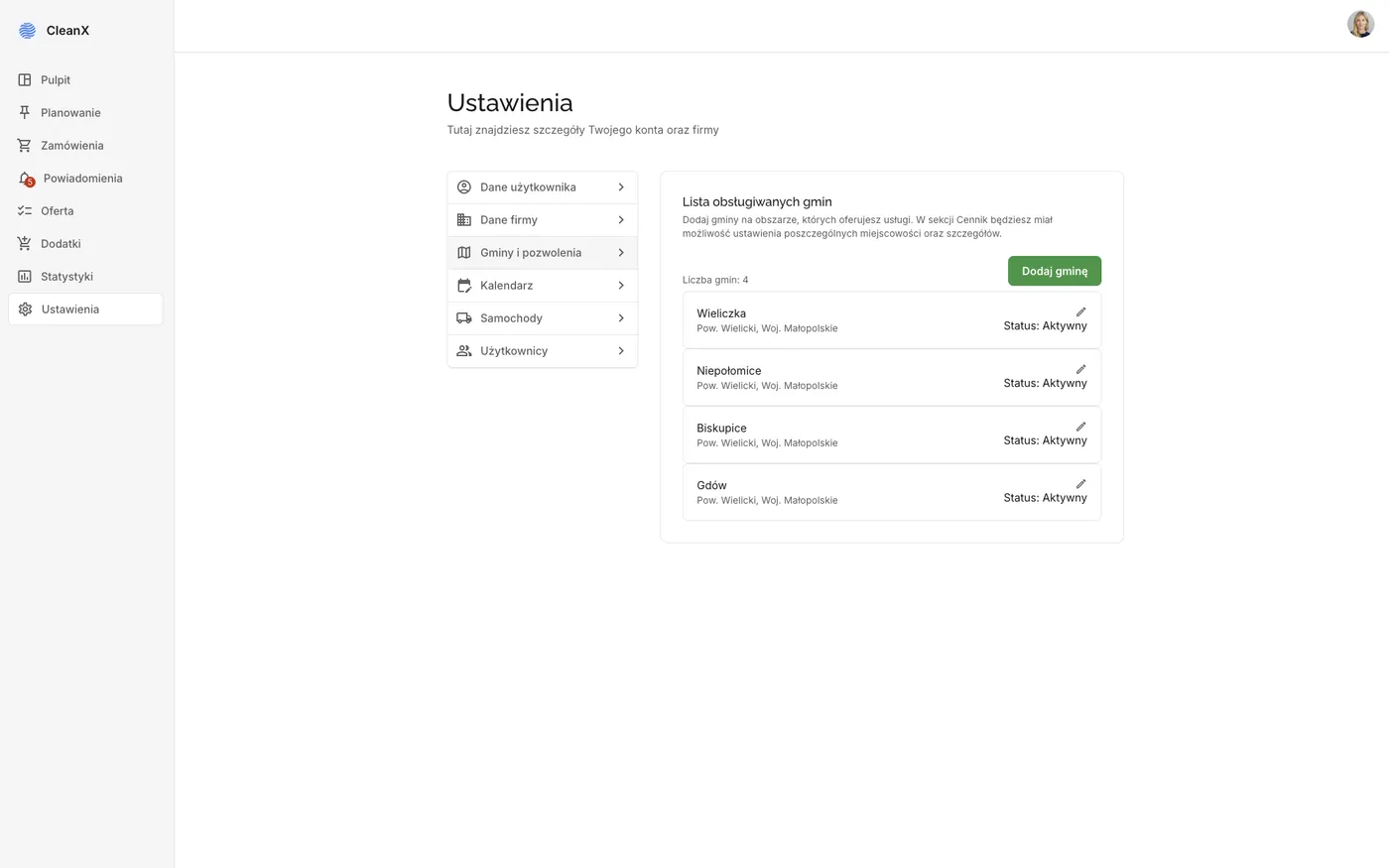
This part of the panel looks unremarkable, yet for both sides of the market it is one of the more important ones. A homeowner must hold a contract with a company that has a permit to collect waste in their municipality, and the absence of such a contract carries heavy fines. So the company adds its serviced municipalities together with permit documentation in the panel, which gives the platform operator proof that the carrier operates legally.

The benefit on the customer side is simpler still. Since the platform knows the carrier’s permits and the customer’s municipality, the required contract can be concluded automatically at the moment of ordering. The homeowner stops worrying about it, because the document is created in the background. Watching the deadlines, meaning alerts about permits nearing expiry, was on the plan as well.

The list of serviced municipalities in the Tidly panel together with the status of the waste collection permit

Serviced municipalities with their permits. This is how the platform knows who may legally collect waste at a given address.

Fleet, drivers and the scope of access

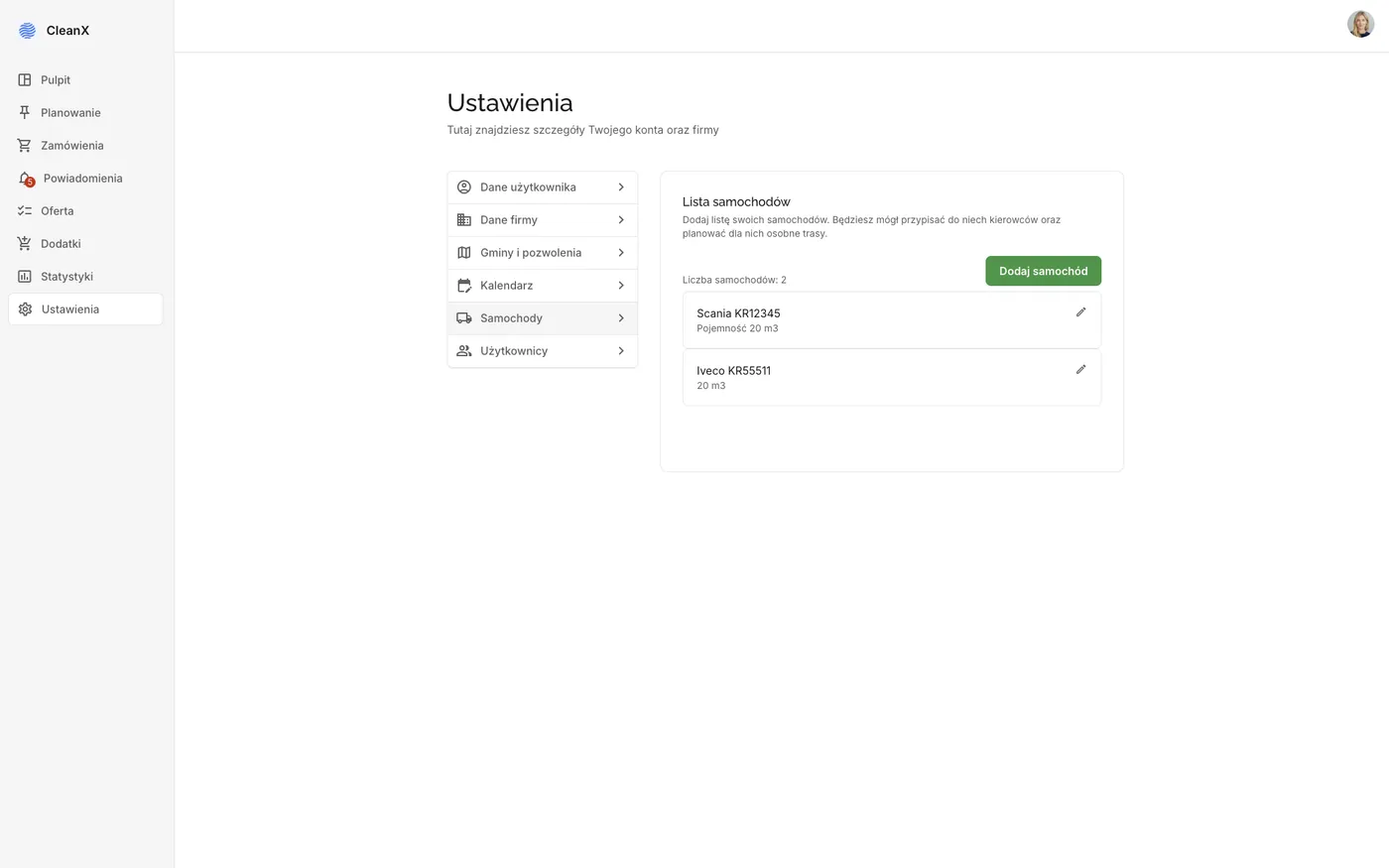
The last configuration layer describes the company’s resources. Trucks have their capacity, drivers are assigned to vehicles, and each of them sees only the delivery list of their own truck. A driver has no access to price lists, settlements or other customers’ data, because none of that is needed to complete a run.

Out of that separation of permissions grew the mobile driver app, a slice of the panel shaped for fieldwork. We cover it in a separate case study, because it follows completely different rules than work at a desk.

The truck list in the Tidly panel with tank capacity, ready for assigning drivers and zones

The fleet is the foundation of zoning, daily limits and driver permissions.

What was built, and what stayed on the drawing board. The panel works within the scope described above. We deliberately did not build four things that were planned: reports for municipalities and treatment stations, an integration with an accounting package, a KSeF integration and a digital vehicle file with service reminders. Automatic ordering of stops along a route also stayed on the list, even though we had a working pattern from the catering system. All of these were simpler than what already existed, so they waited for the moment the platform would win its first paying carriers. That moment never came, which we describe honestly in the marketplace case study.
Three weeks of learning before the first screen

The panel was built in parallel with the other parts of the Tidly ecosystem, because the marketplace would have nowhere to take prices or dates from without it. Below is how this particular piece of work unfolded.

Week 1-2
Analysis of the software market
A review of the solutions available to septic service companies and a detailed analysis of seven leading systems. Picking the features that actually solve a problem, and rejecting the ones that exist merely because they exist.
Week 2-3
Process design and interviews with carriers
Mapping the order handling process across three lanes, around ten phone interviews with companies and a personal meeting with one of the most innovative firms in the region. Verifying the design with people who do this for a living.
Week 3-4
Data architecture and the price matrix
Designing the structure: companies, municipalities, towns, price matrices, tanks, jobs and fleets. The hardest element of the whole panel, because it decided whether automatic pricing was feasible at all.
The weeks that followed
Building the panel
The dashboard, route planning in two views, the order list and details, price lists, municipality, calendar, fleet and permission configuration. In parallel, the marketplace and the customer and driver apps were taking shape.
January 2026
The test launch
The panel released together with the whole platform in the Wieliczka and Niepołomice municipalities, on the test account of a demonstration company.

What this panel actually changes in a company

The platform stopped at the test phase, so we have no results from a deployment at a paying carrier and we will not pretend otherwise. What we can show is what the system does and how much work it removes compared with a process run on paper, drawing on our earlier logistics deployment for meal-prep caterers.

3-4×
Faster daily planning
An estimate from catering deployments: 30-60 minutes on paper against 10-15 minutes by dragging
2
Automations in dividing the work
Zoning of jobs and a daily limit per truck
4
Dimensions in the pricing matrix
Town, capacity, tank type and extra services
0
Phone calls needed to take a job
While keeping the option to add an order taken by phone

Where the 30-60 minutes against 10-15 minutes comes from. This is not a measured result at a septic service company, because no production deployment took place. It is an estimate based on our earlier project, where we built the logistics for meal-prep caterers and went through exactly the same change: from planning routes on paper to dragging jobs between drivers. We give it as a point of reference, not as a promise of a result.

Why this is interesting for a transport company

Waste collection sounds like a narrow niche, yet underneath it is a classic last-mile logistics problem. Jobs scattered geographically, limited vehicle capacity, cost driven by distance, drivers in the field and a dispatcher who plans the working day for a dozen or more trucks every morning. Exactly the same mechanism serves freight transport, field service or refrigerated deliveries.

The Tidly panel shows that such a system does not have to be a multi-month enterprise-class implementation. Zoning, planning on a map, geography-driven price lists and the separation of permissions were built in a no-code approach, as part of a larger ecosystem created in 200 hours of work.

Today we would build it faster still. The same scope delivered with AI-assisted engineering, the method we show in the Fortress and Invoice Automation case studies, takes roughly three times less time and money, and without the limits of a no-code platform. For a transport company that means a custom dispatcher panel has stopped being an investment you need a quarter to think over.

The company that emptied my septic tank answered the phone from six in the morning until ten at night, on Saturdays and on holidays. I have no idea how that man lived. We built a panel where the jobs arrive on their own and the working day is planned by dragging cards instead of shuffling paper.

Krzysztof Gromadzki, founder of RapidLogic
Krzysztof Gromadzki Founder of RapidLogic, creator of Tidly

Does your fleet still plan the day on paper?

Zoning, route planning on a map, distance-driven price lists and an app for drivers are the elements we built in Tidly from scratch. A free digital audit will show how fast and at what cost a similar panel can be built for your company.

Book a free digital audit
See all case studies